Organization chart
The organization chart helps you view your organization's reporting structure, including employees, their managers, and direct reports. It provides a visual representation of the organizational hierarchy, making it easier to identify reporting relationships and team structures.
Note: The Organization Chart option is available only for AD users.
How do I access the organization chart?
- Log in to the ADSelfService Plus User Portal.
- Click the drop-down menu near the user icon located in the top-right corner of the webpage.
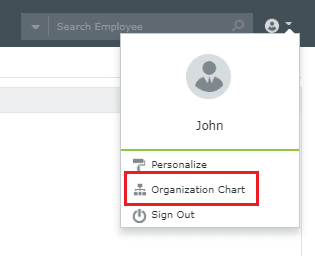
Fig 1: Selecting Organization Chart from the user menu.
- Select Organization Chart.
The organization chart is displayed, allowing you to view the reporting hierarchy within your organization.

Fig 2: The organization chart showing your reporting hierarchy.